








































































































































































Canva Becomes a Go-To Platform for Easy, Professional-Style Photo Editing




In the age of digital content creation, photo editing is no longer limited to professionals. With simple online tools now widely accessible, anyone can edit their images with a professional touch. One such popular platform is Canva, which allows users to remove backgrounds, add new ones or make quick edits—entirely for free.
Thanks to its clean interface and ease of use, Canva has become equally popular among individual users and small entrepreneurs. Once logged in, users are presented with a neat dashboard where they can create custom-sized designs or begin with pre-made templates. To edit a photo, users simply upload the image in the “Uploads” section and drag it onto the canvas to start working.
Background removal is one of the most frequently used features. While Canva’s fully automatic background remover is available only in the Pro version, general users still benefit from a highly effective free tool called “Magic Eraser.” With a simple brush stroke, unwanted elements disappear. Many users who want a complete background cutout often remove it first using free services like remove.bg and then import the transparent PNG into Canva.
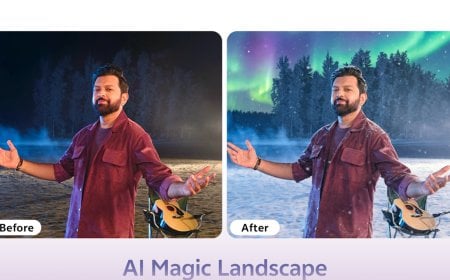
Changing backgrounds in Canva is equally simple. After placing the transparent (PNG) cutout on the canvas, users can choose a new background from the “Photos” section on the left. From plain studio white to beach scenes or office rooms, a wide variety of backgrounds can instantly transform the setting. The “Adjust” panel beneath “Edit Photo” allows fine-tuning of brightness, color and contrast to make the image blend naturally with its environment.
For smaller adjustments, Canva offers useful tools such as “Crop” for trimming, “Auto Enhance” for boosting color and clarity, and shadows from the “Elements” section to add realistic depth. All of these features are free and significantly improve the aesthetic quality of images.
Once editing is complete, users can download the image in PNG or JPG format using the “Share” button. The edited photos can be used for social media, product promotions and other online content.
With its user-friendly design, aesthetic output and wide range of free features, Canva has become a trusted tool for beginners. In today’s digital content era, the platform empowers ordinary users to produce professional-quality work with ease.